Note
Go to the end to download the full example code.
Log & Thermo File Reader
Read LAMMPS log files containing thermodynamic output from the thermo command.
The log file reader automatically:
Detects different thermodynamic output sections with varying columns
Handles (ignores) warnings and broken lines in the log
Skips non-numeric data
Supports multi-run simulations with different
thermo_stylecommands
Relevant documentation: read_log_file()
and extract_thermo_params()
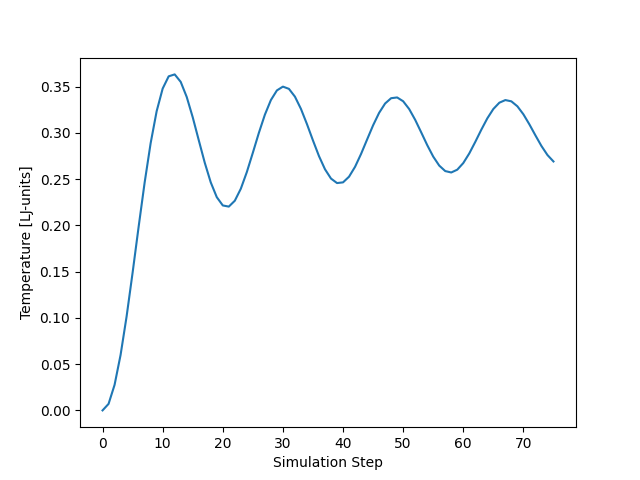
Temperature range: 0.00 - 0.36
Final pressure: -0.170444
import os
from pathlib import Path

import matplotlib.pyplot as plt

from pylimer_tools.io.read_lammps_output_file import read_log_file


# Read complete log file
def _find_fixtures_dir() -> Path:
    for cur in (
        [Path(__file__).resolve().parent] if "__file__" in globals() else []
    ) + [Path.cwd()]:
        for p in [cur] + list(cur.parents):
            candidate = p / "tests" / "pylimer_tools" / "fixtures"
            if candidate.is_dir():
                return candidate
    return Path("tests/pylimer_tools/fixtures").resolve()


_fixtures_dir = _find_fixtures_dir()
log_file = str(_fixtures_dir / "log.lammps")
thermo_data = read_log_file(log_file)

# Access thermodynamic properties
print(
    "Temperature range: {:.2f} - {:.2f}".format(
        thermo_data["Temp"].min(), thermo_data["Temp"].max()
    )
)
print("Final pressure: {:.6f}".format(thermo_data["Press"].iloc[-1]))

# Plot temperature evolution
plt.plot(thermo_data["Step"], thermo_data["Temp"])
plt.xlabel("Simulation Step")
plt.ylabel("Temperature [LJ-units]")
plt.show()
plt.ylabel("Temperature [LJ-units]")
plt.show()
Total running time of the script: (0 minutes 0.040 seconds)