Note
Go to the end to download the full example code.
Normal Mode Analysis (NMA)
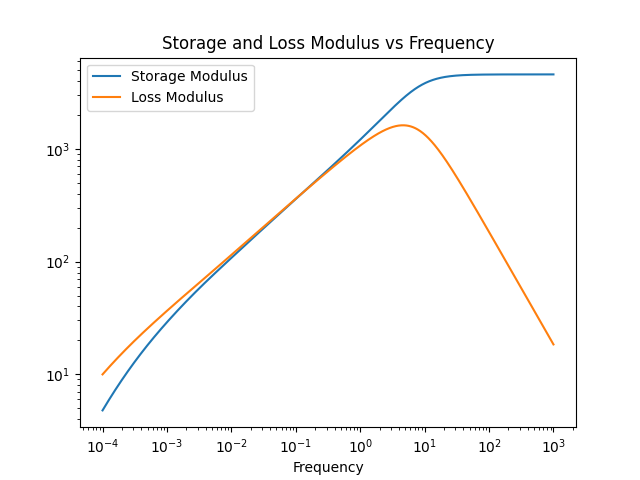
This example demonstrates how to use the NormalModeAnalyzer in pylimer-tools to predict the loss and storage modulus of polymer networks using exact eigenvalue solvers or the Kernel Polynomial Method (KPM).
Reference: Gusev and Bernhard [GB24]
import os
from pathlib import Path

import numpy as np
import pandas as pd

from pylimer_tools.io.read_lammps_output_file import read_data_file
from pylimer_tools_cpp import NormalModeAnalyzer, NormalModeSolver


# Load a LAMMPS data file (replace with your file)
def _find_fixtures_dir() -> Path:
    for cur in (
        [Path(__file__).resolve().parent] if "__file__" in globals() else []
    ) + [Path.cwd()]:
        for p in [cur] + list(cur.parents):
            candidate = p / "tests" / "pylimer_tools" / "fixtures"
            if candidate.is_dir():
                return candidate
    return Path("tests/pylimer_tools/fixtures").resolve()


_fixtures_dir = _find_fixtures_dir()
filePath = str(_fixtures_dir / "structure/network_100_a_46.structure.out")
universe = read_data_file(filePath)
edges = universe.get_edges()

# Create the normal mode analyzer
nma = NormalModeAnalyzer(
    edges["edge_from"],
    edges["edge_to"],
)

# 1. Exact analysis with connected component decomposition and
# dense/sparse solver
nma.find_all_eigenvalues(
    solver=NormalModeSolver.AUTO,
    compute_eigenvectors=False,
    decompose_components=True,
)

# Get the storage and loss modulus across frequencies
frequencies = np.logspace(-4, 3, num=int(1e3))
storage_modulus_exact = nma.evaluate_storage_modulus(omega=frequencies)
loss_modulus_exact = nma.evaluate_loss_modulus(omega=frequencies)

# 2. Kernel Polynomial Method (KPM) without computing full eigenvalues
# KPM calculates viscoelastic moduli in O(N) time for large networks.
storage_modulus_kpm = nma.evaluate_storage_modulus_kpm(
    omega=frequencies,
    num_moments=512,
    num_random_vectors=20,
    num_quadrature_points=1024,
)
loss_modulus_kpm = nma.evaluate_loss_modulus_kpm(
    omega=frequencies,
    num_moments=512,
    num_random_vectors=20,
    num_quadrature_points=1024,
)
Plot and compare the results
df = pd.DataFrame(
    {
        "Frequency": frequencies,
        "Storage Modulus (Exact)": storage_modulus_exact,
        "Loss Modulus (Exact)": loss_modulus_exact,
        "Storage Modulus (KPM)": storage_modulus_kpm,
        "Loss Modulus (KPM)": loss_modulus_kpm,
    }
)
df.set_index("Frequency", inplace=True)
_ = df.plot(
    title="Normal Mode Analysis: Exact vs KPM Moduli",
    loglog=True,
    style={
        "Storage Modulus (Exact)": "b-",
        "Loss Modulus (Exact)": "r-",
        "Storage Modulus (KPM)": "b--",
        "Loss Modulus (KPM)": "r--",
    },
)
/home/runner/work/pylimer-tools/pylimer-tools/examples/normal_mode_analysis/plot_normal_mode_analysis.py:87: Pandas4Warning: The inplace keyword in DataFrame.set_index is deprecated and will be removed in a future version (PDEP-8).
See https://pandas.pydata.org/docs/dev/whatsnew/v3.1.0.html#deprecation-inplace for more details.
  df.set_index("Frequency", inplace=True)
Total running time of the script: (0 minutes 7.937 seconds)